

Table of contents
When people ask me what the “best” explainer video style is, my answer is always the same:
It depends.
Different products, audiences, and placements call for different approaches. What works on a homepage can fall flat in an ad, and vice versa.
Below are five explainer video styles brands use today, with real examples and why each one works where it does.
What makes a great explainer video?
Great explainer videos do a few things really well. They explain the product through a story that will resonate with the audience. They prioritize clarity over cramming in every feature. And they respect the fact that attention spans are short.
The best ones are also flexible. You can use them on a homepage, in ads, or in a sales flow without having to start from scratch.
With that in mind, let’s look at the most common explainer video styles — with real examples.
1. Motion Design Video
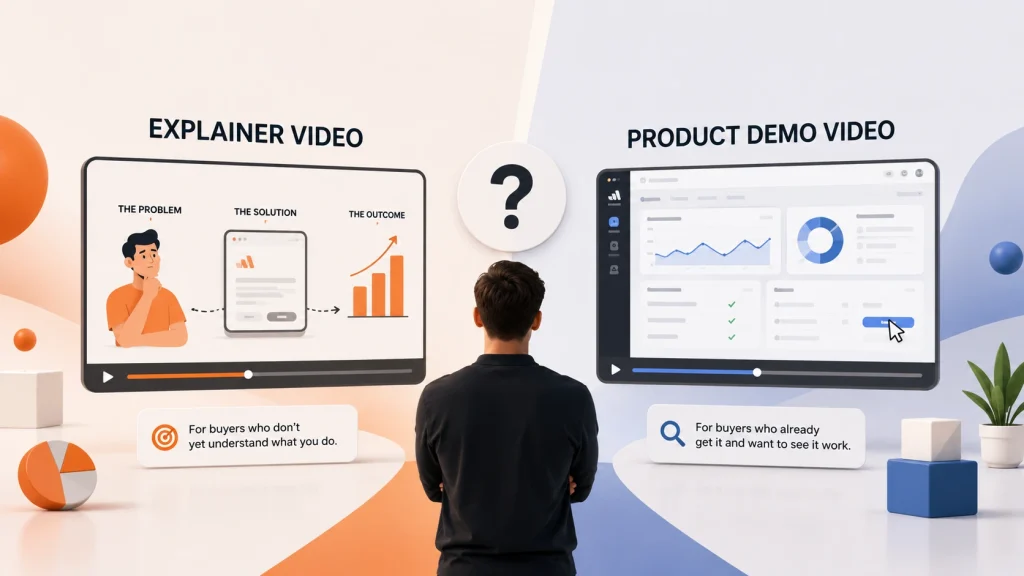
Motion design explainer videos use custom animation to explain what a product does and why it matters. This style shows minimal product UI and instead focuses on concepts, through motion and abstract graphics with text.
It’s a strong choice when:
- Your product is new or abstract
- Your product UI isn’t ready
- You need a video that works across multiple channels
2. Product Explainer Video
Product explainers use real product screens to walk viewers through workflows, features, or use cases. This style is especially effective for SaaS and B2B tech buyers who want to see the product in action before booking a demo.
It works well when:
- Your interface is a key selling point
- Buyers need reassurance before committing
- The video supports sales or product pages
3. Product – Launch Video
Product launch videos are built to grab attention fast. They focus less on full explanations and more on excitement, positioning, and momentum.
These videos are commonly used to:
- Launch a new product or feature
- Support email and social campaigns
- Drive awareness during release windows
4. 3D Explainer Video
When a product is difficult to visualize with flat graphics or UI alone, 3D explainers help bring clarity. This style is often used for infrastructure, systems, hardware-adjacent software, or highly technical platforms.
3D explainers are effective when:
- Architecture or systems need to be visualized
- The product is technical or abstract
- Visual clarity is critical to understanding
5. Customer Video
Customer-led explainers focus on real-world use cases rather than product features. The product is explained through the lens of the customer’s problem and outcome.
These videos are ideal for:
- Later-stage buyers
- Sales conversations
- Case study or testimonial pages
How to choose the right explainer video style
If you’re deciding which direction to take, start with one question:
What does your buyer need to understand about your product?
If they need a simple overview, motion design works well.
If they want to see the product, use a product explainer video.
If you’re launching something new, go with a launch-focused video.
If the product is hard to visualize, 3D may be worth the investment.
Many companies eventually use more than one style as they grow, but the best results usually come from starting with one clear, well-executed explainer.
Final thoughts
Explainer videos don’t need to be long or complicated to work. The strongest examples focus on clarity, pacing, and relevance to the buyer’s journey.
Use the examples on this page as inspiration, not templates. The goal isn’t to copy what others are doing — it’s to understand why certain styles work and apply that thinking to your own product.
If you’re planning your next explainer video, this page should give you a clearer sense of what’s possible and which direction makes the most sense for your product.
Frequently Asked Questions About Explainer Videos
What is an explainer video?
An explainer video is a video that clearly explains what a product or service does to help your target audience understand how your product can solve their challenges.
How long should an explainer video be?
Most explainer videos are between 30 and 90 seconds. Shorter videos work well for awareness and ads, while slightly longer videos are better for product pages or sales conversations. The goal is clarity, not length.
What style of explainer video works best?
There’s no single best style. Motion design works well for high-level explanations, UI-based videos are great for showing how software works, and 3D videos help visualize complex systems. The right style depends on how technical your product is and where the video will be used.
Where should explainer videos be used?
Explainer videos are commonly used on homepages, product pages, pricing pages, sales decks, onboarding flows, and paid campaigns. Many teams reuse the same video across multiple channels.
How much does a 2D explainer video usually cost?
Explainer video pricing varies based on length, style, and complexity. You can expect to pay anywhere from $4000 – $8000 depending on who you hire.